Listen to article – This audio is generated by AI
When ChatGPT ads were first launched, they were invite-only and required large upfront financial commitments. This quickly changed, with the self-serve Ads Manager allowing any eligible business to build and launch a campaign directly.
This shifted the conversation from “Should we launch?” to “How to run ads on ChatGPT?”
This hands-on setup guide walks you through everything you need to know. With a clear understanding of ChatGPT Ads vs. Google Ads, the next step is putting that knowledge into practice, from setting up a verified account and structuring your campaign to tracking what works and optimizing your approach.
ChatGPT Ads Requirements
Before we jump into the steps to create a campaign, let’s cover a critical part: the prerequisites. With these in order, you can avoid half-built campaigns stalling in draft.
Here’s your quick checklist:
- An OpenAI account: A work email is preferable to a personal one; an existing ChatGPT Team/Business/Enterprise organization account can be reused.
- Business details for verification: This includes your legal business name, website URL, logo, and industry category. These details are used for ad review and brand-safety classification.
- A payment method: A credit or debit card (Visa, Mastercard, or Amex). Note that invoicing is available for accounts spending over $10,000/month.
- Creative assets ready: This includes a headline, description, image, and destination URL. Preparing these before opening Ads Manager helps keep your campaign setup moving.
- Realistic access expectations: Account verification runs through a rolling review queue and is not instant. If ChatGPT ads are on your roadmap, set up your account early so verification is complete by the time you’re ready to launch.
Step 1: Create and Verify Your ChatGPT Ads Manager Account
With the prerequisites in place, we can now get into the practical steps of how to run ads on ChatGPT. To set up your account, follow these five steps:
- Step 1: Create the account. Go to ads.openai.com and sign in with an OpenAI account or create one during the sign-up process.
- Step 2: Complete onboarding and verification. Next, enter your business name, website, logo, and industry, followed by your country, currency, and time zone. Identity and business verification is completed through Persona, after which your application enters review against OpenAI’s Ads Policies.
- Step 3: Complete account info. Once access is granted, set Account name and Logo under Settings exactly as they should appear in the ad unit. This is an easy step to miss, but Ads will not serve until this is done.
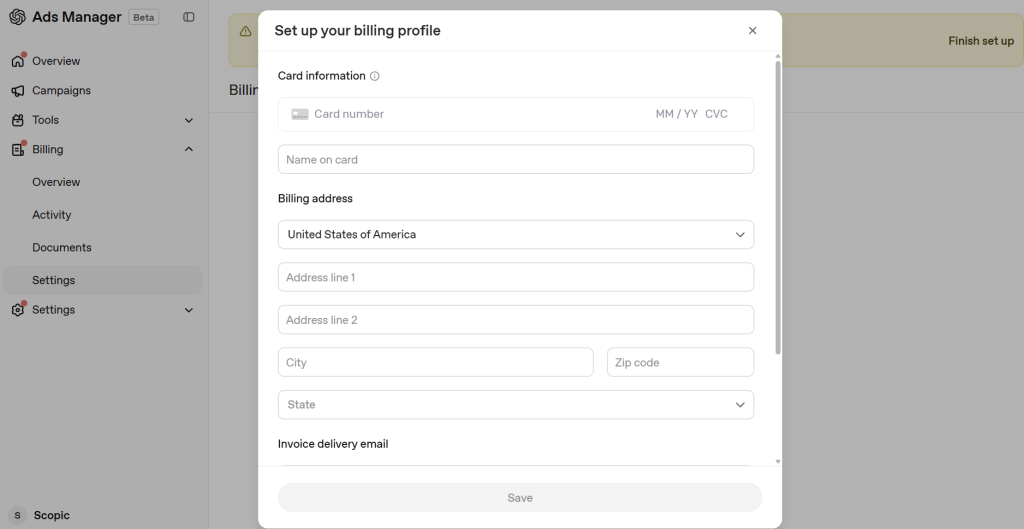
- Step 4: Set up billing. Billing and payment must be fully configured in Ads Manager Beta. Create a billing profile and add your preferred payment method. When you add a card, your bank may show a temporary $100 authorization while OpenAI verifies it. The hold is automatically released once verification is complete.
- Step 5: Invite team members. If others will be managing or contributing to your campaigns, go to Settings → Users → Invite to add them to the account.
Warning: The country or region, billing currency, and time zone selected when an advertiser account is created cannot be changed later.
Step 2: Set Up Conversion Tracking Before You Launch
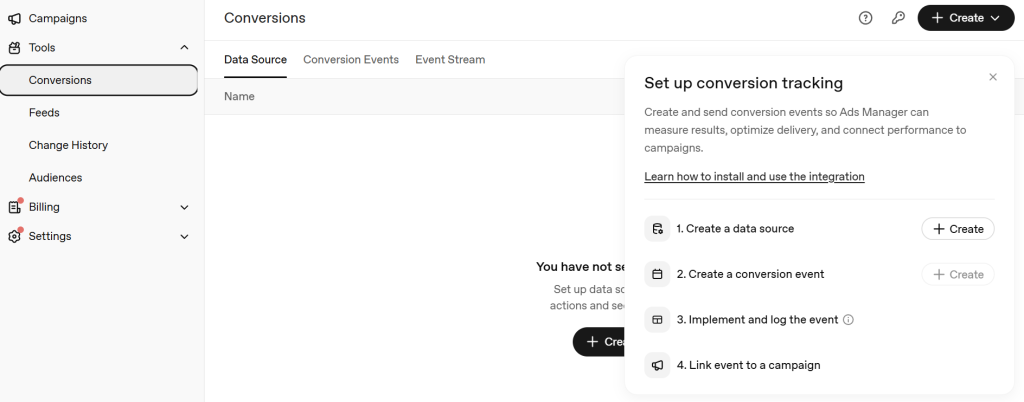
You need to know how your campaign is performing to understand what, if anything, you need to optimize. In addition to metrics like impressions, clicks, spend, and click-through rate, businesses should also track conversions.
Ideally, conversion tracking should be live before your campaign starts so you can measure results from the beginning.
Here’s how you can do it:
- Create a data source in Ads Manager and choose how you will send events: the OpenAI Pixel, the Conversions API (server-side), or both.
- Understand the oppref click reference. The OpenAI click reference, called oppref, is appended to the end of the landing page URL in the following format: www.openai.com?oppref=gAAAAAb123. The Pixel captures it and stores it in a first-party cookie so a later conversion can be tied back to the click. Preserve oppref through redirects and landing-page navigation and include it with Conversions API events when available.
- Run the Pixel + Conversions API together with the same event ID so the same conversion arriving through both routes is deduplicated rather than double-counted.
- Add static UTMs to the destination URL. OpenAI supports static UTM parameters added directly to destination URLs, while dynamic UTM macros are not currently supported. This helps keep ChatGPT Ads traffic identifiable in GA4 and other analytics tools.
- Validate your setup end to end before spending. Confirm that your tracking and conversion events are working as intended before launch rather than troubleshooting them after your campaign is already running.
- Expect reporting differences between platforms. OpenAI Ads Manager, GA4, and other platforms may report different totals due to factors such as attribution methods and windows, reporting time zones, date boundaries, browser and consent conditions, storage availability, and deduplication behavior. OpenAI may also use modeled measurement where available. These differences do not necessarily indicate a tracking error.
Step 3: Structure Your Campaign, Ad Group, and Ads
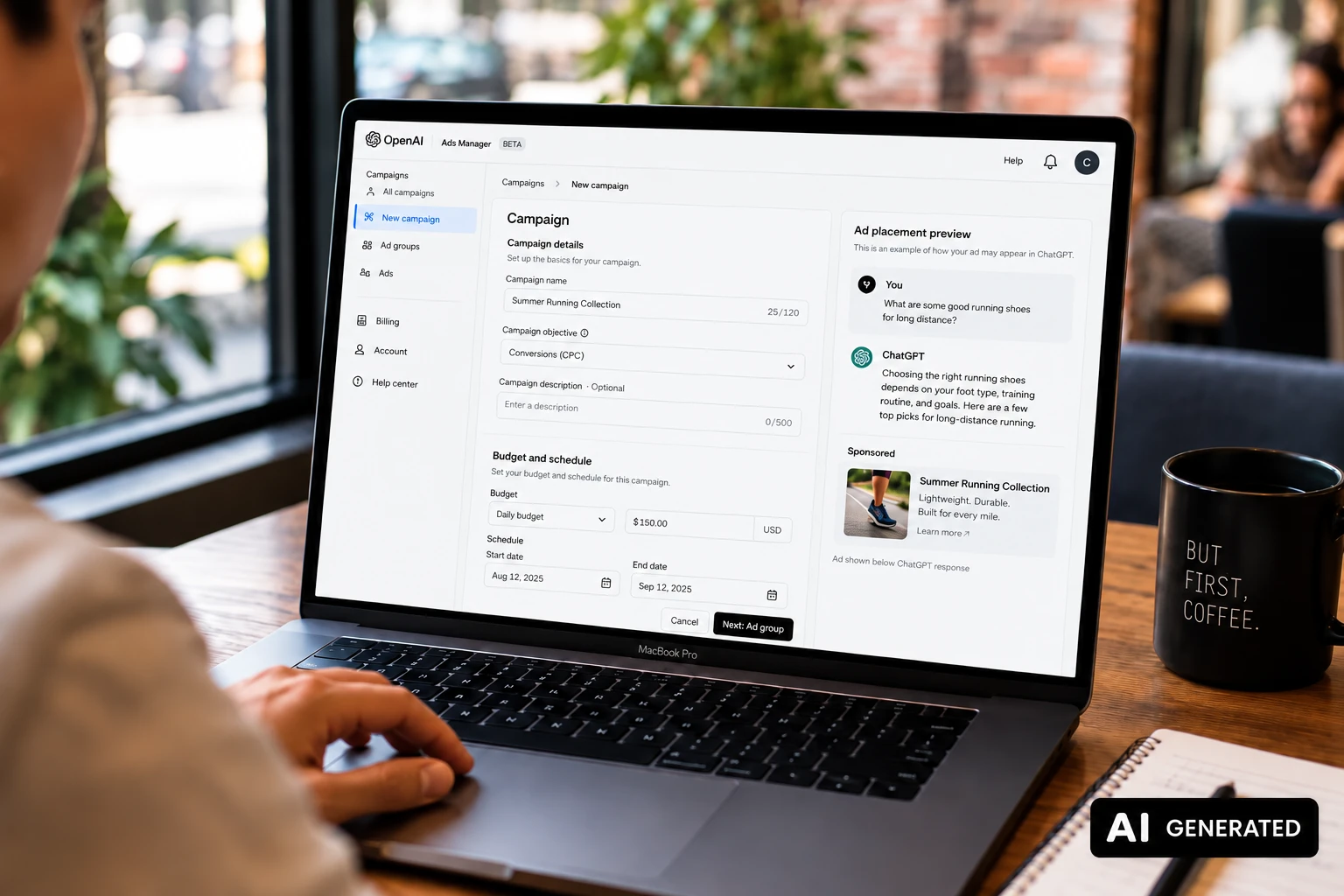
Part of knowing how to advertise on ChatGPT is understanding the three-level structure used to organize your ads. ChatGPT Ads Manager follows a Campaign → Ad Group → Ad structure, with each level controlling different elements of your setup.
Campaign level
At the campaign level, you’ll make the broader decisions that shape how and where your ads run. This includes your objective, budget, location targeting, and flight dates.
- Objective / pricing model: Choose CPM (reach), CPC (clicks), or oCPC (conversion-optimized clicks), depending on what you want the campaign to achieve. Choose carefully: your objective determines how your ads are priced and optimized, and it cannot be changed after the campaign is created. If your goals change, you’ll need to create a new campaign.
- Budget: Choose between a daily or campaign-total budget. You can adjust the amount later, and you can switch from a campaign-total budget to a daily budget, but that switch is irreversible. In the US, the current minimum is $25 per day per campaign.
- Location: Next, decide where you want your ads to appear. Location targeting is set at the campaign level, with options ranging from countries to more granular areas such as states or regions, cities, DMAs, and postal codes where available.
- Flight dates: Finally, set your campaign’s start and end dates to define when your ads are eligible to run.
Ad group level
At the ad group level, you’ll get more specific about how your ads are delivered. This is where you’ll set your context hints and bid.
- Context hints: Use context hints to signal the types of conversations where your ads may be relevant.
- Bid: Set how much you’re willing to bid based on your campaign objective.
- Naming: Keep your ad group names clear and descriptive so campaigns are easier to track and analyze in reporting.
Ad level
At the ad level, you’ll build the creative that users actually see in ChatGPT, including your headline, description, image, and destination URL.
We won’t give away too much too soon, as we discuss this in more detail below.
Step 4: Map Conversation Intent and Set Context-Hint Targeting
Can I reuse my Google keywords? Isn’t the strategy the same?
No, not quite. ChatGPT Ads requires a different approach from traditional keyword-based advertising. Rather than focusing on matching specific search queries, you should consider the broader conversations, needs, and intent surrounding your offering.
So, let’s break down how context hints work and how to use them effectively.
- Context hints are not keywords. At the ad-group level, advertisers provide hints describing the conversations, topics, or keywords where their product or service may be relevant. OpenAI considers these hints alongside other relevance signals, including the context and intent of the conversation, landing page, ad title, and copy. Context hints guide matching, but they are not exact-match targeting rules and do not guarantee that your ad will appear in a specific conversation.
- Don’t simply reuse your Google keyword list across. Instead, use those keywords as a starting point and translate them into the questions, needs, situations, and conversation themes your buyers might discuss. Think about the problems your product solves, its use cases, and the different ways customers describe those needs.
- Keep each ad group focused. Build context hints around one clear product category, theme, or intent area. If you’re targeting meaningfully different products, audiences, or use cases, separate them into different ad groups rather than combining everything into one.
- Use descriptive context hints. Rather than relying only on standalone terms, write phrases that capture real user needs and conversation themes while remaining broad enough to account for natural variations in how people express them.
Step 5: Build Your Ad Creative
As promised, we’re taking a deeper look at building your ad creative. After all, a key part of learning how to run ads on ChatGPT is understanding what users will actually see and how to make your message relevant to the conversation.
Let’s break down the ad unit’s components, their current specs, and the best practices OpenAI recommends for creating useful, relevant ads.
- Know what goes into the ad unit. Each ad includes your advertiser name, favicon (logo), title, copy, landing page, and image. For the creative itself, OpenAI currently recommends titles of 16 to 24 characters, with a maximum of 50, and ad copy of 32 to 48 characters, with a maximum of 100. Images should be square PNG or JPG files, with a current maximum size of 1200 × 1200 pixels.
- Write for the moment. Your ad appears alongside a relevant ChatGPT conversation, so focus on being useful rather than relying on a generic slogan. OpenAI recommends clear, specific, benefit-focused copy that explains what you offer, who it’s for, and when it may be useful. For example, instead of “Transform Your Business Today,” try something more specific, like “Automate invoice processing with AI.”
- Attach your static UTM parameters to the destination URL as covered in Step 2. OpenAI allows you to add your own UTM parameters to each creative so you can track traffic in your analytics tools.
- Build multiple creative variants per ad group. Don’t rely on a single message. OpenAI recommends creating multiple title and copy variations for each offering, with each variation testing a distinct angle rather than simply repeating the same message.
- Use bulk upload when building at scale. For larger launches or multiple campaigns, Ads Manager Beta supports bulk uploads using OpenAI’s campaign schema template. Before uploading, review OpenAI’s Bulk Upload Campaign Schema Checklist to make sure your titles, copy, landing pages, images, and campaign structure meet the current requirements.
Step 6: Launch, Monitor, and Optimize
Now that you know the ChatGPT ads requirements, it’s time to launch your campaign. But this isn’t a set-it-and-forget-it task. Once your ads are live, you’ll need to evaluate, optimize, and evaluate again.
Here are some tips:
- Run a pre-launch check. Confirm that your account verification and billing are complete, your campaigns and ads are active, your campaign dates include the launch date, and your ads have completed review. If your campaign isn’t running or generating impressions, these are some of the first areas to check.
- Avoid making major decisions based on the first few days of performance. As stated by OpenAI, “Give campaigns enough time to gain traction and gather meaningful performance data.” Monitor delivery and performance as the data comes in, then adjust your budget and campaign setup based on what you learn.
- Know what to watch. ChatGPT Ads Manager lets you track impressions, clicks, CTR, average CPC, average CPM, spend, and conversions when conversion measurement is configured. You can then use GA4 or another analytics platform to dig deeper into what users do after clicking your ads.
- Optimize based on what you learn. Use your performance data to identify which campaigns, ad groups, and creatives are generating meaningful results. For example, you may pause ad groups that are spending without meaningful clicks or conversions and shift that budget to the one or two that deliver.
- Set your decision rules before launch. Define what results will lead you to pause, continue testing, or scale the campaign. Set these thresholds in advance so your decisions are guided by your campaign goals rather than short-term performance fluctuations.
At Scopic Studios, we understand that successful campaigns require continuous optimization. From our advertising services to our generative engine optimization services, we help businesses adapt to constantly evolving human and AI-driven search behavior.
Common ChatGPT Ads Setup Mistakes to Avoid
Mistakes happen. But when those mistakes mean wasting your advertising budget, it’s best to be prepared.
Here are some common ChatGPT Ads setup mistakes (and how to avoid them).
- Getting an irreversible setting wrong. Country or region, billing currency, and time zone cannot be changed after account creation, while your campaign objective cannot be changed after the campaign is created. Some budget changes also can’t be reversed. For example, once you switch from a campaign-total budget to a daily budget, you can’t switch back. Our advice? Double-check these settings before moving forward.
- Launching before tracking works. If conversion tracking isn’t properly configured, you could miss valuable performance data from the start. Set up and validate the OpenAI Pixel, Conversions API, or both before launching your campaign.
- Reusing your Google keyword list as context hints. Context hints aren’t exact-match keywords. Instead of simply copying your Google Ads keywords, think about the conversation themes, questions, needs, and situations where your offering would be relevant.
- Forgetting static UTMs. Add static UTM parameters directly to your destination URLs so you can identify and analyze ChatGPT Ads traffic in tools like GA4. OpenAI supports static UTMs, but dynamic UTM macros are not currently supported.
- Cutting the pilot at day seven. As mentioned, you should give campaigns enough time to gain traction and gather meaningful performance data. Rather than treating early results as a final verdict, monitor performance and make adjustments as you collect more meaningful data.
- Missing the account name and logo step. Once you gain access to Ads Manager, complete your account name and logo under Settings → Account info. OpenAI states that ads won’t serve until this step is complete.
Conclusion and Key Takeaways
Running ads on ChatGPT is now a self-serve process, making it more important than ever to understand how to run ads on ChatGPT effectively.
But remember, getting the setup right from the start matters. Verify your account, set up conversion tracking before launch, structure your targeting around conversation intent rather than traditional keywords, and give your campaign enough time to gather meaningful data before judging its performance.
As an experienced PPC management agency, we understand what goes into building campaigns that reach the right audience and turn ad spend into meaningful results. And with our ChatGPT Ads management services, we can help you navigate this emerging advertising channel, from campaign setup and targeting to launching your pilot campaign and optimizing performance.
Frequently Asked Questions
How do I access ChatGPT Ads Manager?
If your business is based in a supported country, you can sign up for Ads Manager Beta at ads.openai.com using an existing OpenAI account or by creating one. You’ll need to complete your account setup, including business verification and billing, before you can begin running campaigns.
What do I need before launching a ChatGPT ad campaign?
Before launching, make sure your Ads Manager Beta account is ready, your advertiser name and logo are set, and your billing profile and payment method are configured. You’ll also need your campaign inputs prepared, including your campaigns, ad groups, and ads. If you plan to measure conversions, configure tracking before traffic starts.
How do I track ChatGPT Ads conversions?
Create a data source in Ads Manager and send conversion events using the OpenAI Pixel, Conversions API, or both. If you use both methods, send the same event ID for the same conversion to enable deduplication. OpenAI also recommends preserving the oppref click reference through redirects and landing-page navigation.
Can I reuse my Google Ads keywords for ChatGPT targeting?
Not directly. ChatGPT uses context hints rather than traditional exact-match keyword targeting. You can use your existing keywords as inspiration, but translate them into descriptive conversation themes, user needs, use cases, and situations where your offering is relevant. OpenAI recommends keeping each ad group focused on a specific theme or intent area.
How long should my first ChatGPT ads pilot run?
OpenAI does not currently recommend a specific number of days for a first pilot. Instead, it recommends giving campaigns enough time to gain traction and gather meaningful performance data. Monitor results as they accumulate and avoid setting an arbitrary testing period that may be too short or unnecessarily long for your campaign.
How many creative variations should I test?
OpenAI does not currently specify an exact number. However, it recommends using multiple ads within each ad group and creating multiple title and copy variations for each offering. Make each variation meaningfully different by testing distinct messages or value propositions rather than making minor changes to essentially the same creative.
About How to Run Ads on ChatGPT Guide
This guide was authored by Baily Ramsey, and reviewed by Sonja Somborac, SEO Specialist at Scopic Studios.
Scopic Studios delivers exceptional and engaging content rooted in our expertise across marketing and creative services. Our team of talented writers and digital experts excel in transforming intricate concepts into captivating narratives tailored for diverse industries. We’re passionate about crafting content that not only resonates but also drives value across all digital platforms.